Viewing a Model's Cost History
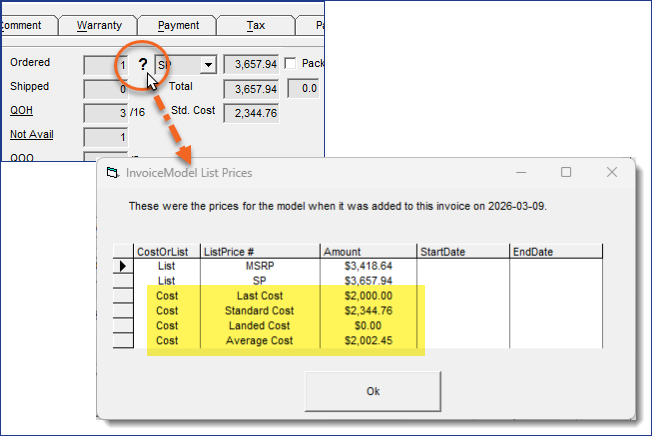
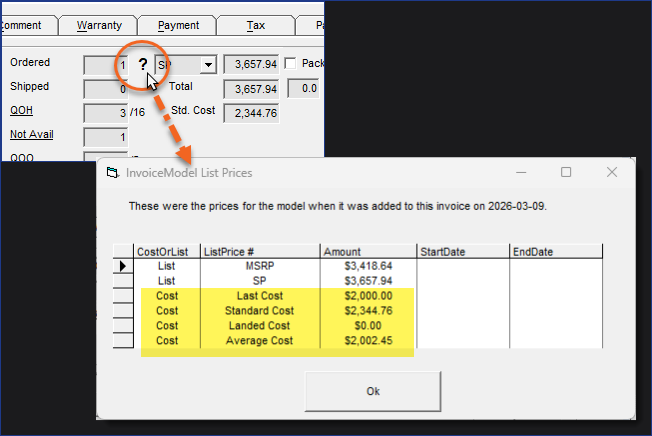
You can view the costs of a model (Standard, Average, Landed, Replacement, or Original) at the time that the model was added to the invoice. This gives you a historical snapshot of the model’s costs at that moment in time.
When this feature is active, EPASS Users with the appropriate security will be able to view costs on the Price History table.
Setting Up
User Security
There is a security option that controls viewing costs in the Price History table. Follow the steps below to activate them for EPASS Users and Groups.
This security option should only be granted to EPASS Users or Groups who are authorized to view costs.
Steps
-
Go to Tools > System Maintenance.
-
On the Tables tab, click User Security, and then click Open.

-
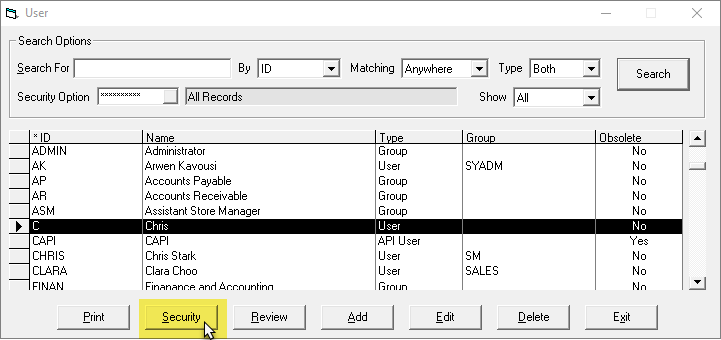
Click a User or Group, and then click Security.
-
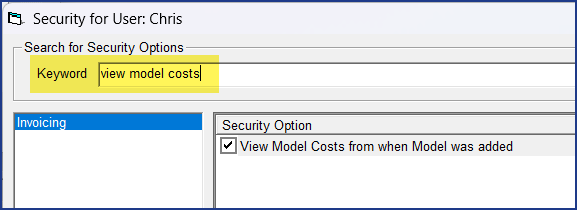
In the Keyword field, enter
View Model Costs. -
Select View Model List Prices from when Model was added.
-
Click OK.
-
Repeat steps 2–5 for additional Users or Groups.